
01
Capture
Describe the geometry that is actually there.
Build irregular outlines, circles, arcs, cutouts, and out-of-square corners on a scaled grid.
MilliDraw 4.7.0 · Room scans and measured drawings
Scan a room in 3D on iPad Pro with LiDAR, or build a measured drawing from your own dimensions. Review the geometry, refine the drawing, and send a clear PDF or DXF.
MilliDraw 5 (5.0.0) is being prepared for the App Store. These preview screens include Photo View Beta and online AI control; those features are not included in the currently published version 4.7.0.
6-minute core workflow
This six-minute tutorial covers the core drawing, photo measuring, and PDF/DXF workflow. For room scanning in version 4.7.0, follow the Live Survey guide below.
Watch on YouTubeLive Survey · New in 4.7.0
Requires iPad Pro with LiDAR. Saved surveys stay on your device and can be reopened offline.
Scan dimensions are estimates and small details may be omitted. Check critical dimensions before fabrication. PDF and DXF export the 2D drawing; this release does not add 3D export.
One job, one clear handoff
MilliDraw stays focused on the measured 2D drawing you need now, without turning a quick site visit into a full CAD session.
Capture
Build irregular outlines, circles, arcs, cutouts, and out-of-square corners on a scaled grid.
Refine
Enter exact values, move geometry by a precise distance, align endpoints, trim intersections, and revise without rebuilding.
Send
Export a readable PDF for people or a DXF base for the next CAD step.
Available in 4.7.0
Live Survey joins the drawing tools: saved rooms in 3D, editable floor plans, calibrated references, clearer line styling, and more control over large drawings.
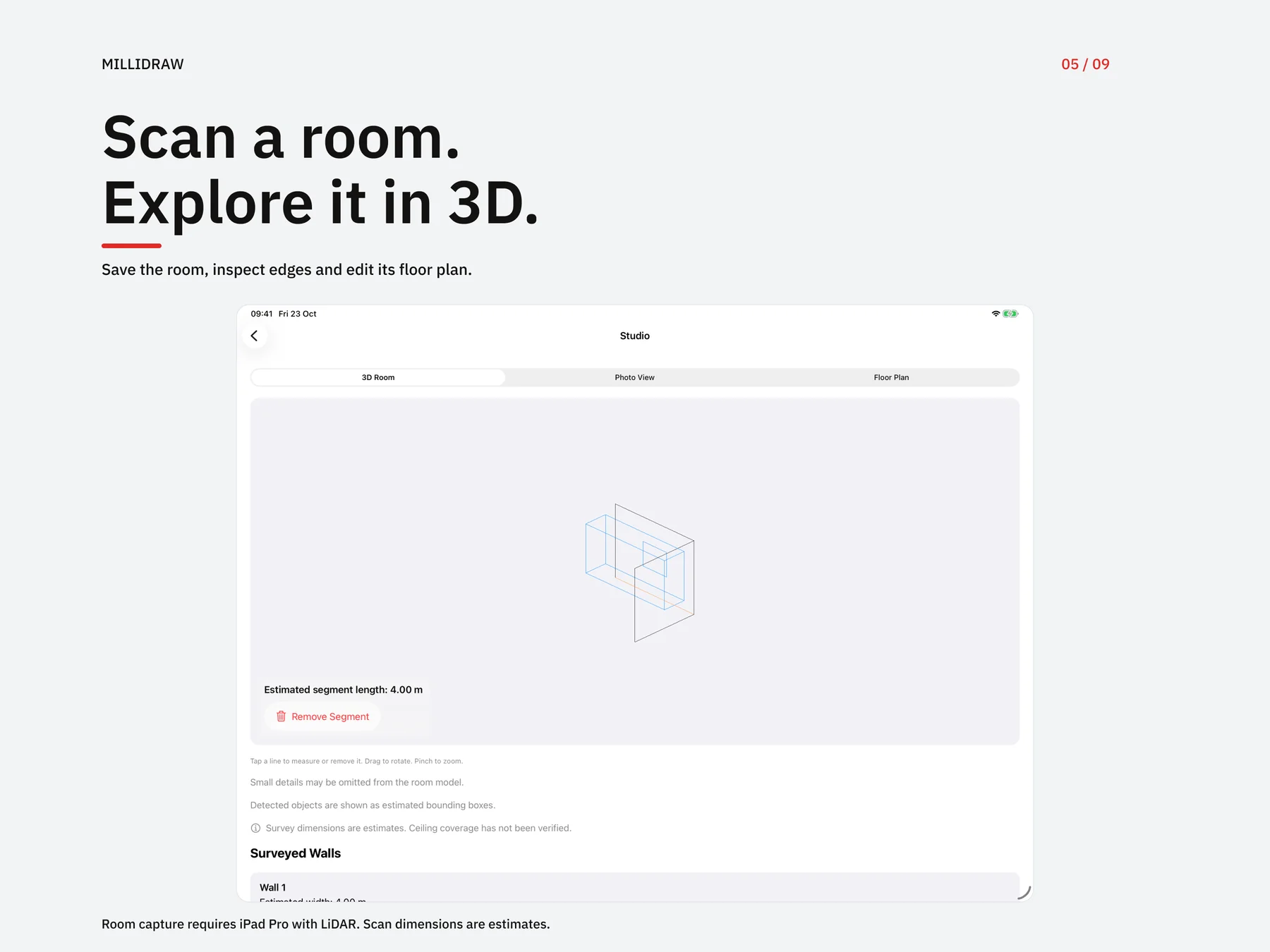
Capture a room on iPad Pro with LiDAR, save the model, then rotate, zoom, and tap edges to inspect their estimated lengths.
Remove unwanted segments or detected objects from the saved room. Undo removals whenever needed.
Open the captured floor plan as a separate editable drawing. Refine dimensions and notes, then use the drawing's PDF or DXF tools.
Scan paper or import JPG, PNG, or the first page of a PDF. Calibrate from one known distance, then draw and measure on top.
Set independent stroke colors and weights. Add solid, hatch, crosshatch, or dot fills; preserve them in saved drawings and PDF output.
Zoom further out, use Fit Drawing to see the whole project, and lock the selected zoom level while you work.
MilliDraw 5 · Preview
MilliDraw 5 (5.0.0) is being prepared for the App Store. These preview screens include Photo View Beta and online AI control; those features are not included in the currently published version 4.7.0.
Explore a photo-based view of a saved survey. Beta reconstruction quality varies with capture coverage, lighting and scene detail; gaps or artifacts may remain. Scan dimensions are estimates. Check important dimensions independently before fabrication.
Optional online control from a compatible AI app: no Mac connector, local IP address or pairing JSON. The client needs MCP Streamable HTTP, OAuth and automatic client registration. Review and approve each agent on your iPad.
Commands and requested drawing or survey content pass through MilliDraw’s server and may reach your AI app’s model provider. The service stores access metadata, without a persistent cloud copy of your drawings.
Read the MCP setup guideMilliDraw 5 · Preview
Preview screens from MilliDraw 5, including Photo View Beta and online AI control. Version 5.0.0 is being prepared; the App Store currently offers 4.7.0.
Inspect the output
A drawing is useful when the next person can understand it. PDF keeps the dimensions readable; DXF carries vector geometry into the next CAD step.
The downloadable samples below demonstrate the file formats. They are separate examples from the projects shown in the gallery.
Built for real work
Use MilliDraw when a photo plus a list of numbers is too easy to misread, but a full CAD workflow is too heavy for the visit.
Communicate marble, wood, glass, and metal shapes with geometry a workshop can inspect.
Keep walls, depths, openings, appliances, and notes in one measured drawing.
Capture irregular rooms and existing conditions before the details turn into message threads.
On iPad Pro with LiDAR
Save a room in 3D, inspect estimated edge lengths, and open its floor plan as an editable 2D drawing. Photo Measure Mode remains available for individual depth-enabled captures.

Made for the worksite
Drawing documents are stored on your device. Draw, reopen projects and export offline. Optional online AI control needs internet access and your explicit approval.
Questions before purchase
Yes. MilliDraw lets you draw lines, squares, triangles, circles, arcs, and irregular 2D shapes, then enter exact lengths, angles, and radii. It is designed for measured drawings rather than free-form illustration.
MilliDraw for iPad
Build the measured sketch, resolve the awkward geometry, and leave the site with a file the next person can use.
Download on the App Store